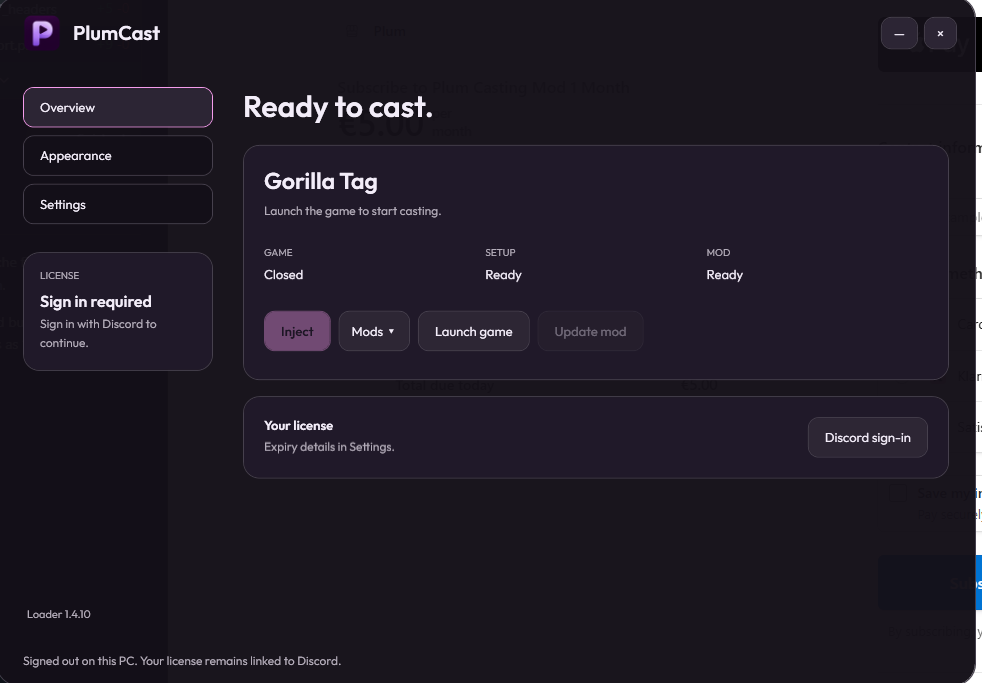
 PLUM LAUNCHER
01
Start the broadcast.
Open the launcher, confirm Gorilla Tag is ready, then choose Casting, Camera Tablet or both from the Mods menu.
Sign in with Discord to verify your license, launch the game and inject when your setup is ready.
 PlumCASTING & CAMERA
FOR GORILLA TAG · PC & PC VR
From a match on your desktop to a camera in your hands. Make the view yours with Plum.
Casting, Camera Tablet, or both. One launcher.
TWO WAYS TO CAST
Load the tools you need. Switch between the desktop casting setup and your in-game camera.
PLUM LAUNCHEROpen the launcher, confirm Gorilla Tag is ready, then choose Casting, Camera Tablet or both from the Mods menu.
Sign in with Discord to verify your license, launch the game and inject when your setup is ready.
Summon the Camera Tablet with your right joystick. Grab it, frame your shot and change views with physical buttons. Load it on its own or alongside Casting.
Auto Ref identifies teams, gives runners a 10-second head start and tracks running times, round points and the 3-minute time cap. Spoken announcements work with your microphone input muted.
How Auto Ref worksArrange your overlays, save named configs and autoload your favorite. The launcher lets you choose your mods, sign in with Discord and check for updates.
FROM ACCOUNT TO CAMERA
Sign in here with Discord, then subscribe for €5 per month through Stripe. Confirmed payment creates your linked license automatically.
Run /license in Discord to check your access and refresh the Customer role. Bought in Discord instead? Use /redeem with your key.
Get the launcher from the official download channel. Install it, sign in with the same Discord account and select your Gorilla Tag folder.
Prepare the game and restart it when prompted. Select Casting, Camera Tablet or both, then click Inject when ready.
YOUR DISCORD. YOUR LICENSE.
Sign in before subscribing so your license goes straight to the right Discord account.
We use your Discord ID and username to link your license and subscription. Website sign-in uses a secure session cookie. Payment details stay with Stripe.
WELCOME TO PLUM
Plum Casting Mod — €5 per month. Renews automatically until cancelled. Your license is linked to the Discord account signed in above after payment is confirmed.
Sign in to subscribeManage billing and cancellation from your account. Your launcher keeps the same Discord login and hardware protection. For Discord purchases, redeem your key in the server.
Sign in, choose your mods and load them into the game. Updates are available inside the launcher.
Download in DiscordWindows · Steam version of Gorilla TagYes. Choose Casting, Camera Tablet or both from the Mods menu beside Inject in the launcher.
A Windows PC with the Steam version of Gorilla Tag. The Camera Tablet is designed for PC VR. A standalone Quest installation is not supported.
Website purchases link your license automatically after confirmed payment. Use /license in Discord to refresh your Customer role, then sign into the launcher with the same account. For Discord purchases, /redeem still links your key. The license is linked to your account and hardware. Expiry details are shown in Settings. Use Discord support if you change PCs.
The teams take turns running. Runners get 10 seconds before chasers start, then their running time is recorded. The longer running time wins the round and earns a point. A 3-minute time cap is saved as a running time; it does not immediately award a point. The first team to the selected score wins.
Yes. Enable Spoken referee for local speech. Enable Speak to lobby too for announcements to the lobby while hosting a private room. Your microphone input can stay muted.
Check for updates in the launcher. Guides, announcements and support tickets are in the Plum Discord. Include your version and error message when asking for help; keep your license key private.